定制自定义二维码
基于zxing的二维码生成笔记
参考:sanfye,在其基础上添加了在前端显示的扩展
前言
随着微信和支付宝的流行,二维码也渐渐的进入了人们的生活中了.
这里,就google的zxing做一个简单的demo
github项目地址zxing_demo
引入jar包
下载jar包
zxing项目地址:github.com/zxing/zxing
jar包下载地址: 点我下载
将下载的jar包导入到项目
matrixToImageWriter类
google提供的matrixToImageWriter类
import java.awt.image.BufferedImage;
import java.io.File;
import java.io.IOException;
import java.io.OutputStream;
import javax.imageio.ImageIO;
import com.google.zxing.common.BitMatrix;

/*
  二维码的生成需要借助MatrixToImageWriter类,该类是由Google提供的,可以将该类直接拷贝到源码中使用,当然你也可以自己写个
  生产条形码的基类
 */
public class MatrixToImageWriter {
    private static final int BLACK = 0xFF000000;//用于设置图案的颜色
    private static final int WHITE = 0xFFFFFFFF; //用于背景色

    private MatrixToImageWriter() {
    }

    public static BufferedImage toBufferedImage(BitMatrix matrix) {
        int width = matrix.getWidth();
        int height = matrix.getHeight();
        BufferedImage image = new BufferedImage(width, height, BufferedImage.TYPE_INT_RGB);
        for (int x = 0; x < width; x++) {
            for (int y = 0; y < height; y++) {
                image.setRGB(x, y,  (matrix.get(x, y) ? BLACK : WHITE));
//              image.setRGB(x, y,  (matrix.get(x, y) ? Color.YELLOW.getRGB() : Color.CYAN.getRGB()));
            }
        }
        return image;
    }

    public static void writeToFile(BitMatrix matrix, String format, File file,String logUri) throws IOException {

        System.out.println("write to file");
        BufferedImage image = toBufferedImage(matrix);
        //设置logo图标
        QRCodeFactory logoConfig = new QRCodeFactory();
        try {
        	image = logoConfig.setMatrixLogo(image, logUri);
		} catch (Exception e) {
			System.err.println("404:logo地址找不到");
		}
        if (!ImageIO.write(image, format, file)) {
            System.out.println("生成图片失败");
            throw new IOException("Could not write an image of format " + format + " to " + file);
        }else{
            System.out.println("图片生成成功!");
        }
    }

    public static void writeToStream(BitMatrix matrix, String format, OutputStream stream,String logUri) throws IOException {

        BufferedImage image = toBufferedImage(matrix);

        //设置logo图标
        QRCodeFactory logoConfig = new QRCodeFactory();
        image = logoConfig.setMatrixLogo(image, logUri);

        if (!ImageIO.write(image, format, stream)) {
            throw new IOException("Could not write an image of format " + format);
        }
    }
}
封装的QRCodeFactory
import java.awt.BasicStroke;
import java.awt.Color;
import java.awt.Graphics2D;
import java.awt.geom.RoundRectangle2D;
import java.awt.image.BufferedImage;
import java.io.File;
import java.io.IOException;
import java.util.Hashtable;

import javax.imageio.ImageIO;

import com.google.zxing.BarcodeFormat;
import com.google.zxing.EncodeHintType;
import com.google.zxing.MultiFormatWriter;
import com.google.zxing.WriterException;
import com.google.zxing.common.BitMatrix;
import com.google.zxing.qrcode.decoder.ErrorCorrectionLevel;


public class QRCodeFactory {
	 /**
     * 给生成的二维码添加中间的logo
     * @param matrixImage 生成的二维码
     * @param logUri      logo地址
     * @return            带有logo的二维码
     * @throws IOException logo地址找不到会有io异常
     */
     public BufferedImage setMatrixLogo(BufferedImage matrixImage,String logUri) throws IOException{
         /**
          * 读取二维码图片,并构建绘图对象
          */
         Graphics2D g2 = matrixImage.createGraphics();
         int matrixWidth = matrixImage.getWidth();
         int matrixHeigh = matrixImage.getHeight();

         /**
          * 读取Logo图片
          */
         BufferedImage logo = ImageIO.read(new File(logUri));

         //开始绘制图片
         g2.drawImage(logo,matrixWidth/5*2,matrixHeigh/5*2, matrixWidth/5, matrixHeigh/5, null);
         //绘制边框
         BasicStroke stroke = new BasicStroke(5,BasicStroke.CAP_ROUND,BasicStroke.JOIN_ROUND);
         // 设置笔画对象
         g2.setStroke(stroke);
         //指定弧度的圆角矩形
         RoundRectangle2D.Float round = new RoundRectangle2D.Float(matrixWidth/5*2, matrixHeigh/5*2, matrixWidth/5, matrixHeigh/5,20,20);
         g2.setColor(Color.white);
         // 绘制圆弧矩形
         g2.draw(round);

         //设置logo 有一道灰色边框
         BasicStroke stroke2 = new BasicStroke(1,BasicStroke.CAP_ROUND,BasicStroke.JOIN_ROUND);
         // 设置笔画对象
         g2.setStroke(stroke2);
         RoundRectangle2D.Float round2 = new RoundRectangle2D.Float(matrixWidth/5*2+2, matrixHeigh/5*2+2, matrixWidth/5-4, matrixHeigh/5-4,20,20);
         g2.setColor(new Color(128,128,128));
         g2.draw(round2);// 绘制圆弧矩形


         g2.dispose();
         matrixImage.flush() ;
         return matrixImage ;

     }


     /**
      * 创建我们的二维码图片
      * @param content            二维码内容
      * @param format             生成二维码的格式
      * @param outFileUri         二维码的生成地址
      * @param logUri             二维码中间logo的地址
      * @param size               用于设定图片大小(可变参数,宽,高)
      * @throws IOException       抛出io异常
      * @throws WriterException   抛出书写异常
      */
     public  void CreatQrImage(String content,String format,String outFileUri,String logUri, int ...size) throws IOException, WriterException{


        int width = 430; // 二维码图片宽度 430
        int height = 430; // 二维码图片高度430

        //如果存储大小的不为空,那么对我们图片的大小进行设定
        if(size.length==2){
        width=size[0];
        height=size[1];
        }else if(size.length==1){
           width=height=size[0];
        }


        Hashtable<EncodeHintType, Object> hints = new Hashtable<EncodeHintType, Object>();
         // 指定纠错等级,纠错级别(L 7%、M 15%、Q 25%、H 30%)
        hints.put(EncodeHintType.ERROR_CORRECTION, ErrorCorrectionLevel.H);
        // 内容所使用字符集编码
        hints.put(EncodeHintType.CHARACTER_SET, "utf-8");
        //hints.put(EncodeHintType.MAX_SIZE, 350);//设置图片的最大值
        //hints.put(EncodeHintType.MIN_SIZE, 100);//设置图片的最小值
        hints.put(EncodeHintType.MARGIN, 1);//设置二维码边的空度,非负数

        BitMatrix bitMatrix = new MultiFormatWriter().encode(content,//要编码的内容
                //编码类型,目前zxing支持:Aztec 2D,CODABAR 1D format,Code 39 1D,Code 93 1D ,Code 128 1D,
                //Data Matrix 2D , EAN-8 1D,EAN-13 1D,ITF (Interleaved Two of Five) 1D,
                //MaxiCode 2D barcode,PDF417,QR Code 2D,RSS 14,RSS EXPANDED,UPC-A 1D,UPC-E 1D,UPC/EAN extension,UPC_EAN_EXTENSION
                BarcodeFormat.QR_CODE,
                width, //条形码的宽度
                height, //条形码的高度
                hints);//生成条形码时的一些配置,此项可选

        // 生成二维码图片文件
        File outputFile = new File(outFileUri);

        //指定输出路径
        System.out.println("输出文件路径为"+outputFile.getPath());

        MatrixToImageWriter.writeToFile(bitMatrix, format, outputFile,logUri);
    }
     /**
      * 创建二维码
      * @param content            二维码内容
      * @param format             生成二维码的格式
      * @param size               用于设定图片大小(可变参数,宽,高)
     * @throws WriterException
      */
     public  BufferedImage CreatImg(String content,String format, int ...size) throws WriterException{
    	 int width = 430; // 二维码图片宽度 430
         int height = 430; // 二维码图片高度430
         //如果存储大小的不为空,那么对我们图片的大小进行设定
         if(size.length==2){
         width=size[0];
         height=size[1];
         }else if(size.length==1){
            width=height=size[0];
         }
         Hashtable<EncodeHintType, Object> hints = new Hashtable<EncodeHintType, Object>();
         // 指定纠错等级,纠错级别(L 7%、M 15%、Q 25%、H 30%)
        hints.put(EncodeHintType.ERROR_CORRECTION, ErrorCorrectionLevel.H);
        // 内容所使用字符集编码
        hints.put(EncodeHintType.CHARACTER_SET, "utf-8");
        //hints.put(EncodeHintType.MAX_SIZE, 350);//设置图片的最大值
        //hints.put(EncodeHintType.MIN_SIZE, 100);//设置图片的最小值
        hints.put(EncodeHintType.MARGIN, 1);//设置二维码边的空度,非负数

        BitMatrix bitMatrix = new MultiFormatWriter().encode(content,//要编码的内容
                //编码类型,目前zxing支持:Aztec 2D,CODABAR 1D format,Code 39 1D,Code 93 1D ,Code 128 1D,
                //Data Matrix 2D , EAN-8 1D,EAN-13 1D,ITF (Interleaved Two of Five) 1D,
                //MaxiCode 2D barcode,PDF417,QR Code 2D,RSS 14,RSS EXPANDED,UPC-A 1D,UPC-E 1D,UPC/EAN extension,UPC_EAN_EXTENSION
                BarcodeFormat.QR_CODE,
                width, //条形码的宽度
                height, //条形码的高度
                hints);//生成条形码时的一些配置,此项可选
        BufferedImage img=MatrixToImageWriter.toBufferedImage(bitMatrix);
        return img;
     }

}
生成本地图片
public static void main(String[] args) {
    String content="https://fedemo.top";
  String logUri="D:\\favicon.ico";
  String outFileUri="D:\\img.jpg";
  int[]  size=new int[]{430,430};
  String format = "jpg";
  try {
      new QRCodeFactory().CreatQrImage(content, format, outFileUri, logUri,size);
  } catch (IOException e) {
      e.printStackTrace();
  } catch (WriterException e) {
      e.printStackTrace();
  }
}

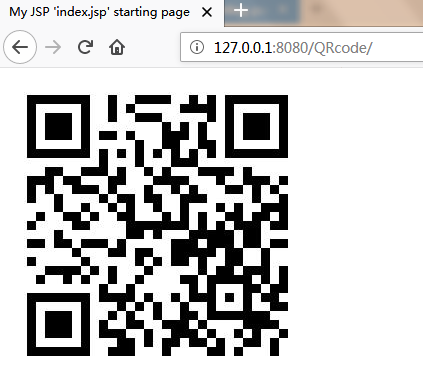
将img流在前端显示
/**
* 获得二维码
* @param mapping
* @param form
* @param request
* @param response
* @throws Exception
*/
public void img(final ActionMapping mapping,
    final ActionForm form, final HttpServletRequest request,
    final HttpServletResponse response) throws Exception {
 String content="https://fedemo.top";
 int[]  size=new int[]{300,300};
 String format = "jpg";
 BufferedImage img=null;
 try {
   img=new QRCodeFactory().CreatImg(content, format, size);
 } catch (WriterException e) {
    e.printStackTrace();
 }
 ImageIO.write(img , "jpg", response.getOutputStream());
}
img图片
<img src="code.do?method=img">
版权声明
本文为博主Fe原创文章,转载请注明出处 https:/fedemo.top/2018/02/07/zxing-qrcode/